 DevCat
Phone and remote
DevCat Mobile
Get notified when your agent finishes or needs you, answer it from your phone, and reach your databases, VPNs and
clusters on the go.
What you can do from the phone
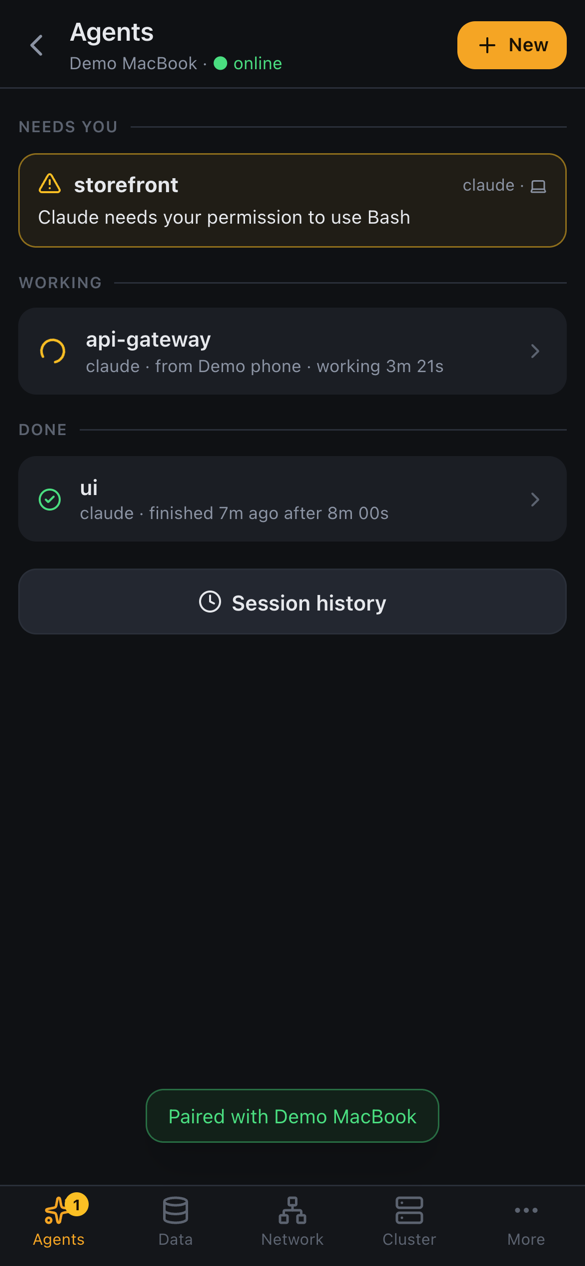
- Agents: see which agents are running, open one's live terminal and answer it, start a new chat or resume an old session.
- Files: browse a project, preview code, Markdown, images, PDFs and spreadsheets, and edit text files.
- Data: browse and edit tables, run queries, edit Redis keys.
- Network: switch VPNs and tunnels on and off.
- Cluster: check pods, logs and deployments.
Pair your phone
- On the computer, click the phone icon in the title bar and turn on Remote access. A QR code appears.
- Point the phone's camera at it. It opens DevCat in the phone's browser.
- Choose Open in DevCat app if you have the app, or Continue in browser to use it right there with nothing to install.
- Give the phone a name and tap Connect.
- On the computer, click Allow, with full access or read-only.
How it connects
There's no DevCat server and no account. The phone talks to DevCat on your computer, encrypted end to end with keys made when you paired:
- Same Wi-Fi: directly.
- Anywhere else (mobile data, another network): through a relay that only passes the encrypted traffic on. DevCat uses free public relays by default, or your own.
Your connection profiles and passwords stay on the computer. The phone only remembers which computers it paired with.
Manage phones
In the Remote access window on the computer:
- Change a phone between full access and read-only at any time.
- Revoke cuts a phone off immediately.
- Activity lists every change a phone made.
Notifications
"Finished" and "needs you" notifications come through the free ntfy app, so they arrive even when DevCat Mobile is closed. Turn them on under More → Notifications on the phone.
DevCat learns an agent's state from Claude Code hooks it adds to the terminals it starts (macOS and Linux).
Without the app window
On a server, over SSH, or with the window closed, run devcat serve instead. Phones pair and
work the same way.